# Overview

<figure><img src="https://4037915796-files.gitbook.io/~/files/v0/b/gitbook-x-prod.appspot.com/o/spaces%2FfKvHQp0gfJ0KWp7aVZQP%2Fuploads%2F9N9v0C9S1XmCMOT51y3g%2Fadiaxcrunch.svg?alt=media&amp;token=aec19792-1d8c-4d6c-9b67-1c6617fc2a36" alt=""><figcaption></figcaption></figure>

**A cross-section forecast problem**

In finance, predicting asset price returns is a fascinating yet very hard problem. For this reason, alternative prediction problems have emerged in an attempt to circumvent these difficulties and still obtain predictions with tradeable potential. One of the most interesting alternatives is the problem of identifying the relative ordering in performance of an investment vehicle, in the cross-section of a pool or subset of them. This is the *cross-section forecast problem*. In this setting, we track a pool of investment vehicles that are generally obtained through some rule (for example S\&P 500 tracks the stock performance of the 500 largest companies in the US) at different dates. This pool is known as the *universe* in financial jargon and its definition is an object of study by itself. The goal of this competition is to rank the performance of all assets in the universe from best to worst at each given date. The target to predict in this competition is the ranking of the future performance of each asset, remapped to the interval \[-1,1], and the scoring function is Spearman's rank correlation between the predicted vs true rankings.

To illustrate an interesting use case of this problem, we can imagine an investment strategy that is long on the best-performing element of the universe, and short in the worst. In this setting, no matter the direction of the market is still possible to obtain positive returns - or to minimize losses.

The dataset presented to the competitors is an obfuscated version of high-quality market data. Therefore, details such as the nature of each investment vehicle, the constant frequency at which dates are measured, and the definition of each feature, are not available. We hope you enjoy the challenge!

**Competition phases and format**

This competition is focused on forecasting and has two phases. The first is the *submission phase* where participants can submit and test their models. The second phase, which is automatic, involves running the models against unobserved live market data.

Submission phase - **12 weeks:**

In the first phase, participants are required to submit either a Python notebook (.ipynb) or Python script (.py) file. This file should contain the necessary code to build, load, or update their models trained on the data. The code will be executed by the CrunchDAO platform for every submission, to obtain predictions on unseen data. Participants can either use static models, trained only once on the initial training set, or dynamic models that update or retrain themselves on the unseen data, as explained further in the documentation.

Out-of-Sample phase - **12 weeks:**

In the second phase, also called [Out-of-Sample](https://en.wikipedia.org/wiki/Cross-validation_\(statistics\)) (OOS), the participant's code will be automatically run by the platform on live market data and evaluated. In this phase, the participants won't be able to modify their code.

Why the two-phase approach?

* Only the performance on Out-of-Sample data will be taken into account.
* Reproducibility of the winning solution is ensured.
* Participants won't be able to exploit data leaks.

{% hint style="info" %}
CrunchDAO is acting as a third-party intermediary in this competition and will never communicate the code to the organizer in any way.
{% endhint %}


# Timeline

**Submission Phase:**

* **May 16, 2023, 05:00 PM CET** - Start of the competition.
* **August 16, 2023, 23:99 PM CET**  - Submission deadline. You must accept the competition rules before this date.

#### Out-of-Sample Phase:

After the final submission deadline, there will be periodic updates to the leaderboard that reflect market data updates that will be run against submitted notebooks.

* **August 16, 2023, 00:00 PM CET** - Out-of-Sample scoring begins.
* **November 16, 2023, 00:00 PM CET** - Competition End Date


# Evaluation

## The objective of the competition

The goal of the participant is to rank the target variable for each stock in the Adia Lab investment universe, from the highest to the lowest, at each given date.

This doesn't require estimating the exact target value for each investment; rather, it involves identifying which investments are likely to perform better than others. Participants can obtain this information from the various features (or Xs) describing each investment at each date in the provided dataset. The features' meanings are unknown to both CrunchDAO and the participants to prevent bias and facilitate sharing of the anonymized dataset.

## The scoring metric

This competition is evaluated on [Spearman Rank Correlation](https://en.wikipedia.org/wiki/Spearman%27s_rank_correlation_coefficient).&#x20;

Each row in the test set represents the predictions (X) associated with a stock of the universe at a given date and its target (Y).

$$
r\_{s}=\rho \_{\operatorname {R} (X),\operatorname {R} (Y)}={\frac {\operatorname {cov} (\operatorname {R} (X),\operatorname {R} (Y))}{\sigma \_{\operatorname {R} (X)}\sigma \_{\operatorname {R} (Y)}}}
$$

Where:

* &#x20;$$\rho\_{R(X),R(Y)}$$ denotes the usual [Pearson correlation coefficient](https://en.wikipedia.org/wiki/Pearson_product-moment_correlation_coefficient), but applied to the *ranked* variables $$X$$ and $$Y$$;
* $$\operatorname {cov}(R(X), R(Y))$$ is the [covariance](https://en.wikipedia.org/wiki/Covariance) of the ranked variables;
* $$\sigma\_R$$ are the [standard deviations](https://en.wikipedia.org/wiki/Standard_deviation) of the ranked variables.


# Data

Each row of the dataset describes an investment vehicle at a certain date.

Here follows a concise description of the columns of the three files comprising the dataset, `X_train` and `y_train`.

`X_train`:

* `date`: A sequentially increasing integer representing a date. Time between subsequent dates is a constant, denoting an unknown but fixed frequency at which the data is sampled. The initial training dataset is composed of 268 dates.&#x20;
* `id`: A unique identifier representing the investment vehicle at a given date. Note that the same asset has a different `id` at each date.
* `0,...,460`: Anonymized features describing an investment vehicle at a given date. Derived from high-quality market data.

`y_train`:

* `date`: Same as in `X_train`.
* `id`: Same as in `X_train`.
* `y`: The target value to predict. It is related to the future performance of the investment vehicle at the given date. The value is normalized between `-1` and `1`.

`X_test`:

* Same structure as `X_train` but comprises only a few dates. This file is used to simulate the submission process locally via `crunch.test()`, or `cruch test`. The aim is to help participants debug their code and have successful submissions. A successful local test usually means no errors during execution on the submission platform.

The dataset is obfuscated.

### Files

* **X\_train.parquet**

<div align="left"><figure><img src="https://4037915796-files.gitbook.io/~/files/v0/b/gitbook-x-prod.appspot.com/o/spaces%2FfKvHQp0gfJ0KWp7aVZQP%2Fuploads%2FNfTa7PcMhUk92myRG1Yx%2FX_train.PNG?alt=media&amp;token=c9e17247-2964-41ef-8a70-645fc1f72897" alt=""><figcaption></figcaption></figure></div>

* **y\_train.parquet**

<div align="left"><figure><img src="https://4037915796-files.gitbook.io/~/files/v0/b/gitbook-x-prod.appspot.com/o/spaces%2FfKvHQp0gfJ0KWp7aVZQP%2Fuploads%2F6u1eFMjuLhN8SfBzbFHO%2Fy_train.PNG?alt=media&amp;token=681e0f6e-9fdc-4ac7-82b0-08e52305ecfb" alt="" width="375"><figcaption></figcaption></figure></div>


# Prize

The winner's rank will be determined at the end of the Out-of-Sample period, based on the metric described in the [Evaluation](/the-tournament/evaluation) section.

<table><thead><tr><th> Winner’s rank</th><th> Prize value</th><th data-hidden></th></tr></thead><tbody><tr><td>1st Place</td><td>$40,000</td><td></td></tr><tr><td>2nd Place</td><td>$20,000</td><td></td></tr><tr><td>3rd Place</td><td>$10,000</td><td></td></tr><tr><td>4th Place</td><td>$5,000</td><td></td></tr><tr><td>5th Place</td><td>$5,000</td><td></td></tr><tr><td>6th Place</td><td>$5,000</td><td></td></tr><tr><td>7th Place</td><td>$5,000</td><td></td></tr><tr><td>8th Place</td><td>$3,500</td><td></td></tr><tr><td>9th Place</td><td>$3,500</td><td></td></tr><tr><td>10th Place</td><td>$3,000</td><td></td></tr></tbody></table>


# Code Requirements

**To ensure the reproducibility of your work, you will need to follow certain guidelines to participate in the competition. These guidelines will also allow our scoring system to run your code in the cloud during the Out-of-Sample period without any issues.**

**The guidelines concern:**

* Code architecture
* Resources consumed by your code, including RAM, CPU, and GPU
* Usage of external libraries

{% hint style="info" %}
Always make sure that your code is properly working using the CrunchDAO code interface, that your code can run under the allowed resources and that the libraries your notebook uses are whitelisted.&#x20;
{% endhint %}


# The Submission Code Interface

Your submission needs to provide at least three components: imports, `train()`, and `infer()`.

1. **imports**: As with any script, if your solution contains dependencies on external packages make sure to import them. The system will automatically install your dependencies. Make sure that you are using only packages that are whitelisted [here](https://adialab.crunchdao.io/submit?tab=libraries).
2. **`train()`**: In the training phase the users will build the model and train it such that it can perform inferences on the testing data. The model must be saved in the `resources` directory.
3. **`infer()`**: In the inference function the model trained in the previous step will be loaded and used to perform inferences on a data sample matching the characteristic of the training test.

A basic but functional submission is available here:&#x20;

{% embed url="<https://colab.research.google.com/github/crunchdao/adialab-notebooks/blob/main/basic_submission.ipynb>" %}
Notebook hosted on google colab
{% endembed %}

{% embed url="<https://github.com/crunchdao/adialab-notebooks/blob/main/basic_submission.ipynb>" %}
Notebook hosted on GitHub
{% endembed %}

### Code Signature

Since Python does not enforce types, you need to make sure that your code will expect these arguments.

{% code fullWidth="false" %}

```python
def train(
    X_train: pandas.DataFrame,
    y_train: pandas.DataFrame,
    model_directory_path: str
) -> None
```

{% endcode %}

```python
def infer(
    X_test: pandas.DataFrame,
    model_directory_path: str
) -> pandas.DataFrame
```


# Resource Limit

In order to be eligible for submission, the following conditions must be met:

#### Submission Phase

* Your code needs to cover all the period in the private leaderboard under 5 hours
* CPU **or** GPU ≤ 20 hours runtime to cover the public testset *(32 dates)* with a 2.5% tolerance
* CPU RAM ≤ 64Gb
* GPU RAM ≤ 120Gb
* Runtime quota reset every week (on Tuesday at 3:00 PM UTC)

#### Out-of-Sample Phase

* Your code needs to cover 1-time cross-section in under 16 hours.
* CPU **or** GPU ≤ 23 hours runtime to cover the OOS testset *(36 dates)* with a 5% tolerance
* CPU RAM ≤ 64Gb
* GPU RAM ≤ 120Gb

{% hint style="info" %}
You can control your resource consumption under [**my submission**](https://adialab.crunchdao.com/project) tab.
{% endhint %}

<figure><img src="https://4037915796-files.gitbook.io/~/files/v0/b/gitbook-x-prod.appspot.com/o/spaces%2FfKvHQp0gfJ0KWp7aVZQP%2Fuploads%2FEmRTjXRIPoVjSzTW3TNS%2Fimage.png?alt=media&amp;token=8f0d698f-5cee-4d79-a0f5-54afd885d09b" alt=""><figcaption><p>Your current cloud usage</p></figcaption></figure>


# Whitelisted Libraries

To ensure that the users are not using malicious packages on the competition's infrastructure we whitelisted a series of Python packages.

{% hint style="info" %}
You can search the whitelisted library under the submit section of the website.
{% endhint %}

{% embed url="<https://adialab.crunchdao.com/submit?tab=libraries>" %}
Follow this link to the whitelisted libraries
{% endembed %}

<figure><img src="https://4037915796-files.gitbook.io/~/files/v0/b/gitbook-x-prod.appspot.com/o/spaces%2FfKvHQp0gfJ0KWp7aVZQP%2Fuploads%2FixtI0k42rF60VqgMZr5W%2Fimage.png?alt=media&amp;token=0114d0ab-eeb1-4fb5-9740-d42314a22bf7" alt=""><figcaption><p>Whitelist</p></figcaption></figure>

{% hint style="info" %}
You can request the crew to add a library to the whitelist via [Discord](https://discord.gg/veAtzsYn3M) or the [Forum](https://forum.crunchdao.com/).
{% endhint %}


# How to participate

To get started and submit your first solution you will need to pass through the following steps:

1. Create an account on the CrunchDAO platform
2. Setup your workspace to get access to the data
3. Test your solution locally
4. Get your score on the public leaderboard

{% hint style="info" %}
The QuickStarter Notebook below is designed to get you started in just 3 minutes.
{% endhint %}

{% embed url="<https://colab.research.google.com/github/crunchdao/adialab-notebooks/blob/main/basic_submission.ipynb>" %}
Quickstart hosted on Google Colaboratory
{% endembed %}

{% embed url="<https://github.com/crunchdao/adialab-notebooks/blob/main/basic_submission.ipynb>" %}
Quickstart hosted on GitHub
{% endembed %}


# Create an account

Creating an account on the CrunchDAO platform will allow you to be identified and get access to the competition dataset. Follow the link below to join the competition.

{% embed url="<https://account.crunchdao.com/auth/register?ref=doc>" %}


# Setup

**Two distinct formats of submission are accepted in this competition:**

* **Python Notebook (.ipynb)**
* **Python Script (.py)**

## Python Notebook Participants

This notebook is an example of a basic submission. It also covers how to set up and get access to the datasets:

{% embed url="<https://colab.research.google.com/github/crunchdao/adialab-notebooks/blob/main/basic_submission.ipynb>" %}
Basic Notebook Submission hosted on Google Colaboratory
{% endembed %}

{% embed url="<https://github.com/crunchdao/adialab-notebooks/blob/main/basic_submission.ipynb>" %}
Basic Notebook Submission hosted on Google Colaboratory
{% endembed %}

{% hint style="info" %}
We highly recommend going through this notebook to understand the setup and gain familiarity with the submission process.
{% endhint %}

Go to[ https://adialab.crunchdao.com/submit](https://adialab.crunchdao.com/submit?tab=notebook) and click on the *"reveal the command"* button to access the commands that will set up your personal workspace.&#x20;

<figure><img src="https://4037915796-files.gitbook.io/~/files/v0/b/gitbook-x-prod.appspot.com/o/spaces%2FfKvHQp0gfJ0KWp7aVZQP%2Fuploads%2FaP4M9H5cvTOoD0osLcs4%2Fimage.png?alt=media&amp;token=56494935-4481-4466-b441-6b485be64188" alt=""><figcaption><p>click in reveal the  to access your secure token and setup command</p></figcaption></figure>

Copy and paste the commands under the *"reveal the command"* overlay in your notebook to be able to access the data.&#x20;

Here is a quick description of each command:

```python
# Installs the crunch library in your workspace.
%pip install crunch-cli --upgrade

# To use the library, import the crunch package and instantiate it to be able to access its functionality.
# You can do that using the following lines:
import crunch
crunch = crunch.load_notebook(__name__)

# Authenticates your user, downloads your project workspace, and enables your access to the data
!crunch setup <username> --token <token>

# moves to the created working directory
%cd <username>
```

Note that the provided token acts as an authentication mechanism and has a duration of three minutes, after which it will become obsolete.&#x20;

## Python Script Participants

Go to [https://adialab.crunchdao.com/submit](https://adialab.crunchdao.com/submit?tab=cli) and click on *"reveal the command"* button to access the commands that will set up your workspace. Execute the commands in a terminal, in a working directory of your choice.

<figure><img src="https://4037915796-files.gitbook.io/~/files/v0/b/gitbook-x-prod.appspot.com/o/spaces%2FfKvHQp0gfJ0KWp7aVZQP%2Fuploads%2FiJuDlHq6GeKcfijyzsSZ%2Fimage.png?alt=media&amp;token=b3d917c0-d486-421f-b35d-62b97cf8f41d" alt=""><figcaption><p>click in reveal the command to access your secure token and setup command</p></figcaption></figure>

## Tokens

The website generates new tokens every minute, and each token can only be used once within a 3-minute timeframe.

This prevents any issues if your token is accidentally shared because it will likely have already been used or expired.

This token allows the CLI to download data and submit it on your behalf.


# Your working directory

Once you run the setup commands, the `crunch` package will download the data and create a folder named after your username on the platform. Here is a snapshot of your working directory folder.

```
$ tree
.
├── data
│   ├── X_test.parquet
│   ├── X_train.parquet
│   └── y_train.parquet
├── main.py
├── requirements.txt
└── resources

3 directories, 5 files
```

{% hint style="info" %}
If you need to save some files to run your code on the CrunchDAO's servers, like the weights of your model, the tree structure... etc., you have to save them under the **resources** folder.
{% endhint %}


# A basic but functional solution

{% hint style="info" %}
In the following notebook, you will set up your workspace and submit a basic solution to the ADIA Lab competition.
{% endhint %}

{% embed url="<https://colab.research.google.com/github/crunchdao/adialab-notebooks/blob/main/basic_submission.ipynb>" %}
Again the basic Submission notebook
{% endembed %}

{% embed url="<https://github.com/crunchdao/adialab-notebooks/blob/main/basic_submission.ipynb>" %}
The corresponding Python file with the basic submission is here
{% endembed %}


# Testing your code

Once a solution seems interesting it's time to test its proper execution within the interface.

**The crunch test command allows you to perform a local test of your code, on the public test set provided by the organizer. This test set is purposefully very small and will not be taken into account for the scoring on the public leaderboard.**

```python
# Run a local test in a notebook
crunch.test(force_first_train=True, train_frequency=2)
```

```sh
# Run a local test in your terminal
crunch test --no-force-first-train --train-frequency 2
```

* This function of the crunch package will run your code locally, simulating how it is called in the cloud&#x20;
* You can set up the retraining frequency as you wish&#x20;
* A training frequency of 2 means that the system will retrain your model every two dates&#x20;
* In a notebook,`force_first_train=True` indicates that your model will be trained on the first date of the test set
* Similarly, `--no-force-first-train` controls the same parameter for terminal calls to the function (Note that in this case, using this flag will do the opposite as  `force_first_train=True` in the notebook case)

```
Usage: crunch test [OPTIONS]

  Test your code locally.

Options:
  -m, --main-file TEXT       Entrypoint of your code.  [default: main.py]
  --model-directory TEXT     Directory where your model is stored.  [default:
                             resources]

  --no-force-first-train     Do not force the train at the first loop.
  --train-frequency INTEGER  Train interval.  [default: 1]
  --help                     Show this message and exit.
```


# Submitting

Once tested a code can be submitted.

## Submit with Notebook

Submitting a notebook solution is very simple.&#x20;

Download your notebook under the .ipynb format and upload it under the [submit section](https://adialab.crunchdao.com/submit?tab=notebook) of the CrunchDAO platform.

#### Specifying package versions

Since submitting a Notebook does not includes a `requirements.txt`, users can instead specify a package's version using [requirement specifiers](https://pip.pypa.io/en/stable/reference/requirement-specifiers/#examples) at the import level in a comment on the same line.

```python
# valid statement
import pandas # == 1.3
import sklearn # >= 1.2, < 2.0
import tqdm # [foo, bar]
import scikit # ~= 1.4.2
from requests import Session # == 1.5
```

Specifying multiple times will cause the submission to be rejected if they are different.

```python
# inconsistant versions will be rejected
import pandas # == 1.3
import pandas # == 1.5
```

Specifying versions on standard libraries will do nothing (but they will still be rejected if there is an inconsistent version).

```python
# will be ignored
import os # == 1.3
import sys # == 1.5
```

## Submit with Crunch CLI

```
Usage: crunch push [OPTIONS]

  Send the new submission of your code.

Options:
  -m, --message TEXT      Specify the change of your code. (like a commit
                          message)

  -e, --main-file TEXT    Entrypoint of your code.  [default: main.py]
  --model-directory TEXT  Directory where your model is stored.  [default:
                          resources]

  --help                  Show this message and exit.
```

## Check your submission

If the submission is complete you will see it appears under your [submission section](https://adialab.crunchdao.com/project).

<figure><img src="https://4037915796-files.gitbook.io/~/files/v0/b/gitbook-x-prod.appspot.com/o/spaces%2FfKvHQp0gfJ0KWp7aVZQP%2Fuploads%2FvyNUbHOSJBrAk9vy6KvE%2Fimage.png?alt=media&amp;token=84cfd508-4dff-4dc3-8d1c-2921b9ee3369" alt=""><figcaption><p>Some interesting submissions ;)</p></figcaption></figure>

The backend is parsing your submission to retrieve the code of the interface's functions (ie: `train`, and `infer`) and the dependencies of your code. By clicking on the right-side arrow you will access your submission content.

<figure><img src="https://4037915796-files.gitbook.io/~/files/v0/b/gitbook-x-prod.appspot.com/o/spaces%2FfKvHQp0gfJ0KWp7aVZQP%2Fuploads%2FwyQJSVZnkonqjxzebiv7%2Fimage.png?alt=media&amp;token=13d39cf5-babe-466e-beaf-cecc5ec33f64" alt=""><figcaption><p>The view of a submission once properly uploaded</p></figcaption></figure>

{% hint style="info" %}
Make sure that the system properly parsed your code and imports
{% endhint %}


# Get a score on the leaderboard

Once submitted it's time to run your model in the cloud

**To get a score on the leaderboard, you need to run your code on the competition server. Your code will be fed with never seen data, and your predictions will be scored on this private test set.**

## The Submission Phase Leaderboard

{% hint style="info" %}
During the submission phase, you can submit multiple times and receive a score on the private test set, up to five times a day. This approach is useful for iterating on various solutions, but may result in overfitting to the private test set. It's crucial to have a robust solution for this portion of the data, rather than focusing solely on the submission phase leaderboard. A high-quality submission should demonstrate consistent performance on both the test set and the training data. Discrepancies in performance between the two data segments may indicate an inadequate model.
{% endhint %}

## Running your submission in the Cloud to get a score

To run your submission on the cloud and get a score, you need to click on a submission and then on the **Run in the Cloud** button.

<figure><img src="https://4037915796-files.gitbook.io/~/files/v0/b/gitbook-x-prod.appspot.com/o/spaces%2FfKvHQp0gfJ0KWp7aVZQP%2Fuploads%2F8RN4ERW9gLhmKNyvF9Fw%2Fimage.png?alt=media&amp;token=bedb6b7a-ec83-4476-b2bc-7099a94bedd4" alt=""><figcaption><p>Click on run in the cloud to launch your run</p></figcaption></figure>

## How your code is called by the system

Your code is called on each individual date. Code calls go through the dates sequentially, but are otherwise independent. Be reminded that the data contains, for each individual date, the cross-section of the investment vehicles of the universe at that time. &#x20;

At each date, your code will access only the data available up to that point.

Here is a high-level overview of how your code will be called:

```python
# This loop over the private test set dates to avoid leaking the x of future periods
for date in dates:
    # The wrapper will block the logging of users code after the 5 first dates
    if date >= log_treshold:
        log = False

    # If the user asked for a retrain on the current date
    if retrain:
        # Cutting the sample such that the user's code will only access the right part of the data
        X_train = X_train[X_train.date < date - embargo]
        y_train = y_train[y_train.date < date - embargo]
        
        # This is where your `train` code is called
        train(X_train, y_train, model_directory_path)
    
    # Only the current date
    X_test = X_test[X_test.date == date] 
    
    # This is where your `infer` code is called
    prediction = infer(model_directory_path, X_test)

    if date > log_treshold:
        predictions.append(prediction)

# Concat all of the individual predictions
prediction = pandas.concat(predictions)

# Upload it to our servers
upload(prediction)

# Upload the model's files to our servers
for file_name in os.listdir(model_directory_path):
    upload(file_name)
```

&#x20;


# Run in the Cloud Environment

To run your code, configure your Running Environment.

{% hint style="info" %}
**Each cloud run can be configured differently.**
{% endhint %}

**STEP 1.**

Don't waste cloud resources! Run some local tests first.

If a code doesn't run on your environment, it won't run on the cloud.&#x20;

<figure><img src="https://4037915796-files.gitbook.io/~/files/v0/b/gitbook-x-prod.appspot.com/o/spaces%2FfKvHQp0gfJ0KWp7aVZQP%2Fuploads%2FeflmuQNwiSmQgUYMaoux%2Fimage.png?alt=media&amp;token=ba73befe-ef74-44aa-9290-4a07a034a713" alt=""><figcaption><p>Local test</p></figcaption></figure>

**STEP 2.**

The system is parsing your code dependencies to assign you a CPU or GPU cloud environment.

{% hint style="info" %}
GPUs are very expensive and bad for the environment. 🌳

Don't claim a GPU if you don't need it!
{% endhint %}

<figure><img src="https://4037915796-files.gitbook.io/~/files/v0/b/gitbook-x-prod.appspot.com/o/spaces%2FfKvHQp0gfJ0KWp7aVZQP%2Fuploads%2F5UAP5UzDF5b0sCvYPIPw%2Fimage.png?alt=media&amp;token=29a018b3-ac40-40c0-a511-91c7e1d514ea" alt=""><figcaption><p>GPU vs CPU</p></figcaption></figure>

**STEP 3.**

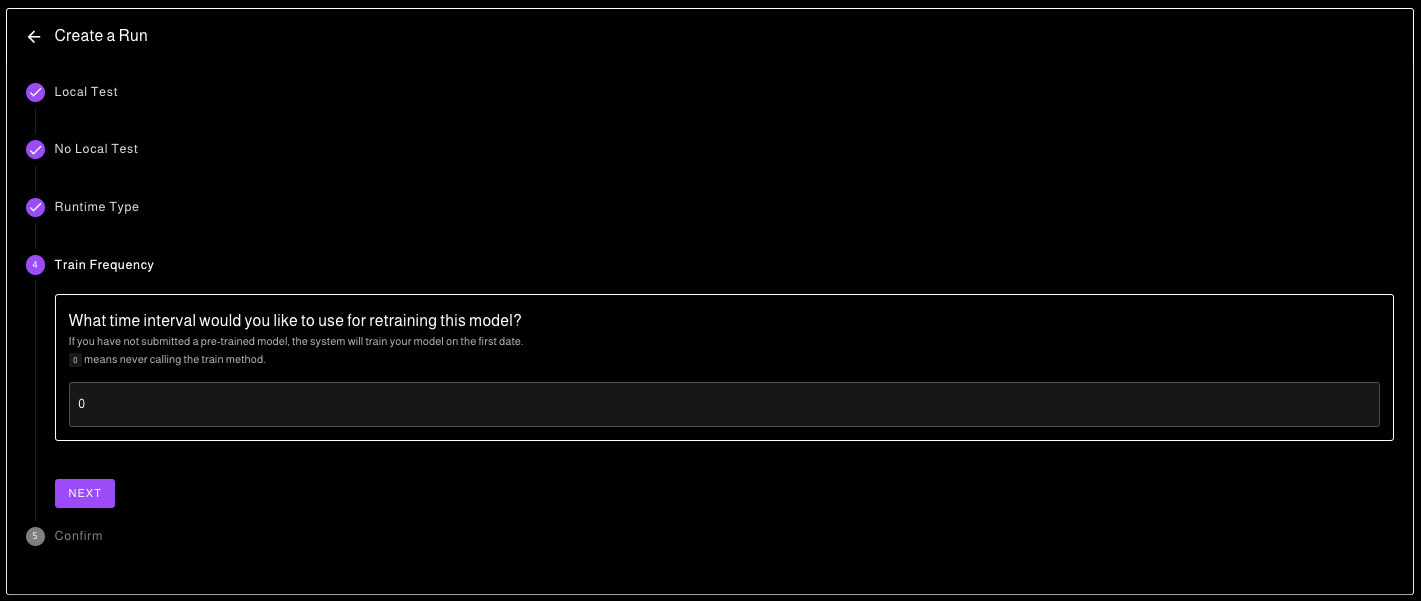
You can configure the re-training frequency of your model as you wish.

{% hint style="info" %}
Remember that your code will need to process all the dates in the private test set in under 5 hours of compute. Adjust your retraining frequency so that your code remains within the limits.
{% endhint %}

<figure><img src="https://4037915796-files.gitbook.io/~/files/v0/b/gitbook-x-prod.appspot.com/o/spaces%2FfKvHQp0gfJ0KWp7aVZQP%2Fuploads%2FafvxbrlAAklZsozioarD%2Fimage.png?alt=media&amp;token=6ccecbb4-5b49-446d-966b-1861ff77a461" alt=""><figcaption><p>Training frequency</p></figcaption></figure>


# Monitoring your Cloud Runs

Once launched, check that everything is going fine with the execution logs.

**Once you successfully launch your run on the cloud, you can monitor its proper execution with the run logs.**

{% hint style="info" %}
The logs for the execution of your code are only displayed on the 5 first dates of the test set, to avoid meta-labeling (a common cheat method in data-science tournaments)
{% endhint %}

<figure><img src="https://4037915796-files.gitbook.io/~/files/v0/b/gitbook-x-prod.appspot.com/o/spaces%2FfKvHQp0gfJ0KWp7aVZQP%2Fuploads%2FmWMqF1Ba0xvQ5uCh6kdH%2Fimage.png?alt=media&amp;token=bbd12a2c-bb02-4981-9349-9fd3c6c015cf" alt=""><figcaption><p>Log of your cloud execution for debug</p></figcaption></figure>

## Stop a Run

If you see that your code is not executing properly, you can terminate the running instance by clicking on the **terminate** button.

## Your Run's statuses, durations, and mean scores

<figure><img src="https://4037915796-files.gitbook.io/~/files/v0/b/gitbook-x-prod.appspot.com/o/spaces%2FfKvHQp0gfJ0KWp7aVZQP%2Fuploads%2F2bbUVbv5TPPnjKTFN436%2Fimage.png?alt=media&amp;token=46cd21e5-3e5c-4d09-8577-66a8cb3100b0" alt=""><figcaption><p>Statuses and errors in of your Runs</p></figcaption></figure>


# Out-of-Sample Submission Selection

During the Out-of-Sample, your code will be run every week on a submission of your choice.

{% hint style="info" %}
By default the system selects the best successful run.
{% endhint %}

**If and only if** you want to select another submission than the best run, use the Out-of-Sample Parameters Selector.

<figure><img src="https://4037915796-files.gitbook.io/~/files/v0/b/gitbook-x-prod.appspot.com/o/spaces%2FfKvHQp0gfJ0KWp7aVZQP%2Fuploads%2Fy7FTV0EGtO0uXIHiOLBh%2Fimage.png?alt=media&amp;token=dc49988a-3ba3-4ded-a19d-025ed56679dc" alt=""><figcaption></figcaption></figure>

### Parameters

<table><thead><tr><th width="186">Name</th><th>Description</th><th data-hidden>Description</th><th data-hidden></th></tr></thead><tbody><tr><td>Submission</td><td>Submission to use during the Ouf-of-Sample.</td><td></td><td></td></tr><tr><td>Runtime Type</td><td>Whether to use a CPU or a GPU runner.</td><td></td><td></td></tr><tr><td>Train Frequency</td><td>Frequency of which your submission's train function will be called.<br><em>The frequency is a modulo <strong>on the moon, not loop</strong>.</em></td><td></td><td></td></tr><tr><td>Force First Train</td><td>Force the call of the submission's train function at the first loop.<br><em>Some submission with a resources folder are not working correctly without having their train function called at least once.</em></td><td></td><td></td></tr></tbody></table>


# Out-of-Sample Evaluation Phase

## Out-of-Sample Evaluation Phase

During the Out-of-sample (OOS) phase, your submissions will undergo iterative scoring, released each Monday at 6 PM CEST, from Monday, August 28th, and concluding on Monday, November 20th.&#x20;

### **Leaderboard Update** <a href="#leaderboard-update" id="leaderboard-update"></a>

The leaderboard will be regularly updated on a weekly basis. The mean score will be calculated as the average Spearman correlation across all Out-of-sample `dates` released from the inception of the Out-of-Sample phase. This approach will progressively mitigate score volatility, leading the leaderboard to increasingly reflect the structure of the final rankings over time.

### **In-Depth Scoring Breakdown** <a href="#in-depth-scoring-breakdown" id="in-depth-scoring-breakdown"></a>

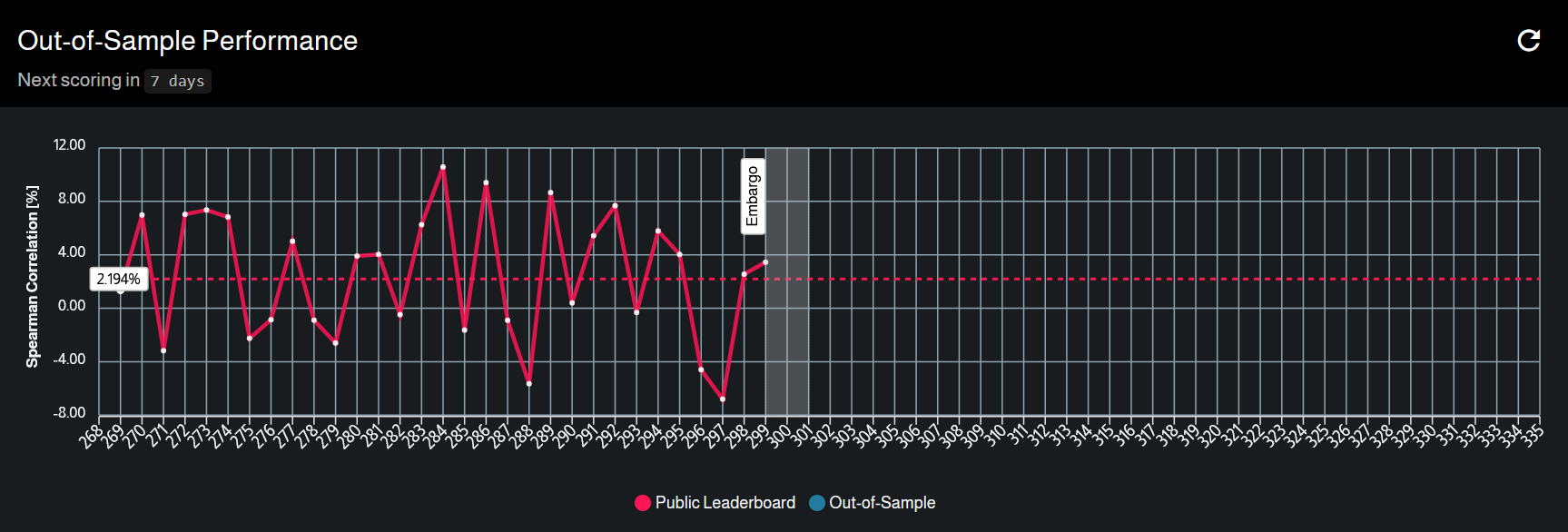
Detailed performance metrics for your Out-of-sample submissions are available within the Out-of-Sample Performance section on [your submission](https://adialab.crunchdao.com/projects/@me) page. You will have access to the following information:

* The performance of the selected submission, on a **per-date** basis.
* A comprehensive breakdown of your performance on your Out-of-Sample run, presented on a **per-date** basis.

<figure><img src="https://files.gitbook.com/v0/b/gitbook-x-prod.appspot.com/o/spaces%2FfKvHQp0gfJ0KWp7aVZQP%2Fuploads%2FB07NRHpvQKHlnphB5ttu%2Fimage.png?alt=media&#x26;token=1678f07f-a706-4051-8471-a9d59a58b300" alt=""><figcaption><p>Out-Of-Sample perforamance</p></figcaption></figure>

### **Final Leaderboard Consideration** <a href="#final-leaderboard-consideration" id="final-leaderboard-consideration"></a>

It is important to note that the sole leaderboard considered for **rewards** determination will be the **ultimate iteration** taking place on **November 20th**. Given its finality, this leaderboard will encompass the complete array of your scores across all Out-of-Sample `dates`.​


# Advanced Material

Here you will find some suggestions on how to tackle the problem. We provide two notebooks with different approaches.

This tutorial notebook includes sections on data exploration, feature engineering, validation and linear models

{% embed url="<https://colab.research.google.com/github/crunchdao/adialab-notebooks/blob/main/advanced_exploratory_data_analysis.ipynb>" %}
Advanced EDA
{% endembed %}

{% embed url="<https://github.com/crunchdao/adialab-notebooks/blob/main/advanced_exploratory_data_analysis.ipynb>" %}
Advanced EDA
{% endembed %}

Finally, this tutorial notebook includes a more advanced modeling attempt using a boosting model, a custom loss function, and hyperparameter optimization.

{% embed url="<https://colab.research.google.com/github/crunchdao/adialab-notebooks/blob/main/advanced_modelling_analysis.ipynb>" %}
Advanced modeling
{% endembed %}

{% embed url="<https://github.com/crunchdao/adialab-notebooks/blob/main/advanced_modelling_analysis.ipynb>" %}
Advanced modeling
{% endembed %}

The models trained in these notebooks can be used as a baseline for the competition. We encourage you to surpass them!


# Known Issues

## CatBoostError: Can't create train working dir: catboost\_info error

CatBoost create a directory for persisting his state. But the Run does not allow you to create file anywhere.

### Change the train directory to: `/tmp`

*If the state doesn't need to be persisted*, the `/tmp` directory is the way to go.

```python
model.set_params(train_dir='/tmp/catboost_info')
```

### Change the train directory to: `model_directory`

If the state does need to be persisted, store everything inside the `model_directory` as this folder will be reused for the Out-of-Sample phase.

```python
info_path = os.path.join(model_directory, 'catboost_info')
model.set_params(train_dir=info_path)
```